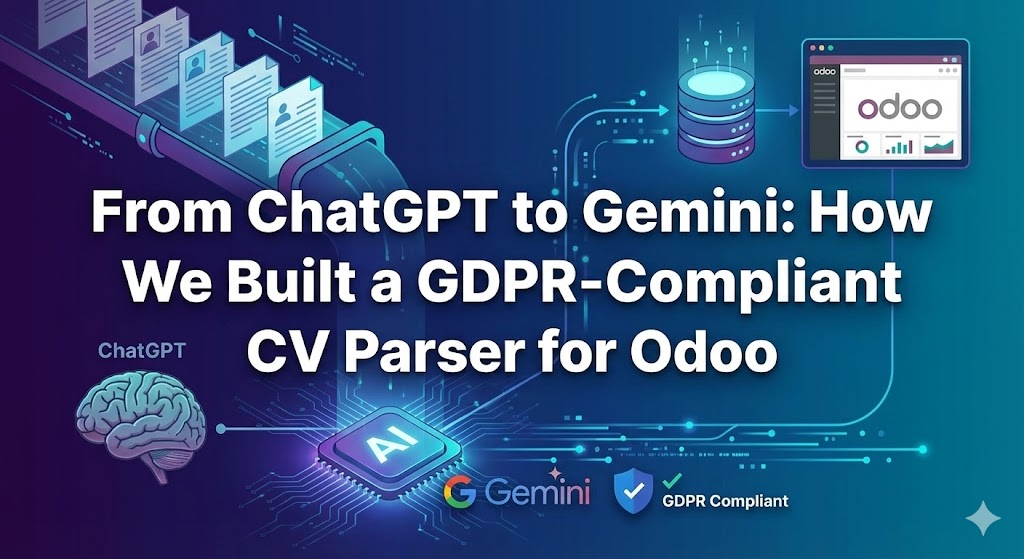
A few years ago, a business owner in France contacted us to help digitalize their workflow. This company specializes in recruiting people for Work-Study Programs (known in France as Alternance).
In short, Alternance is a system where you split your time between school and a job. It is a great deal because the student gets a degree for free, gains real work experience, and receives a salary based on the French minimum wage (SMIC). It is designed to help young people and job seekers enter the workforce or switch careers.
The company acts as an expert middleman because the process can be overwhelming to manage alone. Here is how they operate:
- Finding Candidates: They source students or job seekers interested in work-study programs.
- Screening: They interview applicants to ensure they meet official government criteria (age, educational background, etc.).
- Matching with Employers: They find companies looking for apprentices and send them the best profiles.
- Handling Paperwork: Once a company decides to hire, the agency handles the complex administrative steps and ensures contracts are signed.
Basically, they bridge the gap between the apprentice and the employer, making the journey smoother for everyone.
The Bottleneck: Manual Data Entry
Before contacting us, they were doing everything manually using notebooks and spreadsheets. We built a complete recruitment pipeline for them based on the Odoo Community Recruitment module.
We developed custom modules to extend Odoo’s base functionality to support their specific workflow. Once completed, the solution allowed the company to track everything in one place: the database of applicants and companies, the recruitment stages, appointments, automated Mail/SMS notifications, the calendar, and digital contract signatures.
The solution was a success. Everyone liked the new system, and it made their daily lives much simpler. However, one major pain point remained: Data Entry.
Recruiters still had to find profiles and manually enter them into the recruitment pipeline before they could start working. The business owner was frustrated. He was paying recruiters to hunt for talent, but they were spending hours doing manual data entry.
We decided to automate this using AI.
Designing the Automation Workflow
Our first idea was to build an API so third parties could send data directly to the system. While this would have been ideal, the third-party sources were not ready for it.
We reached an agreement to receive all applicant CVs via email instead. These were simple emails with the CV attached. Once we confirmed we were receiving the CVs in a dedicated mailbox, we designed the following automation workflow:
- Read Emails: Log in to the email provider and fetch unread emails.
- Extract Attachment: Download the attached CV (usually a PDF).
- OCR Processing: Perform Optical Character Recognition to extract raw text from the CV.
- AI Parsing: Use an LLM to transform that raw text into a structured JSON format.
- Odoo Integration: Use Odoo XML-RPC to create a record in the recruitment module. We also attach the original PDF so the recruiter has a reference if the AI misses anything.
- Assignment: Automatically assign the lead to an available recruiter.
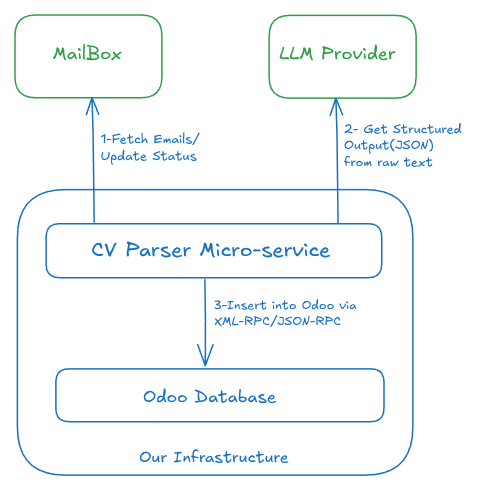
Iteration 1: Tesseract and ChatGPT
For our first solution, we developed a microservice using Tesseract for OCR and the ChatGPT API for the LLM logic.

It worked fine for a couple of months, and the client was happy. However, technical issues started to appear. Tesseract struggled to process certain CV layouts, especially scanned documents. Additionally, Tesseract was consuming too much RAM on our VPS and wasn’t delivering the high level of accuracy we needed.
Iteration 2: LlamaParse for Better OCR
To solve the weaknesses of Tesseract, we replaced it with a cloud service called LlamaParse.
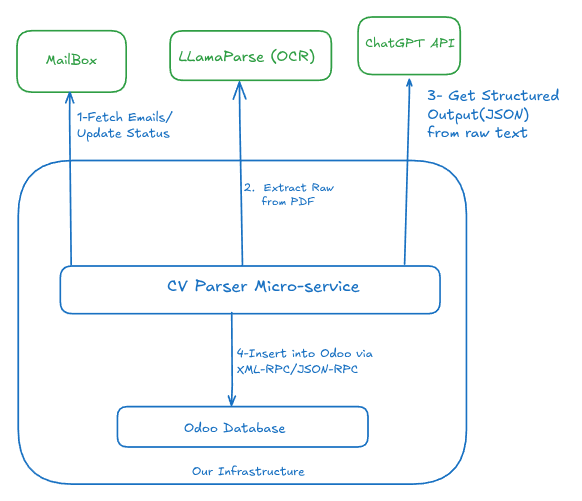
For context, LlamaParse is a specialized tool created by LlamaIndex. It is designed specifically to “read” and parse complex documents (like PDFs) so AI models can understand them better.
Switching to LlamaParse was a great decision. It allowed us to process any CV format—scanned or digital—and obtain excellent results from the LLM. We ran this setup for a few months until we hit a new problem. This time, it wasn’t technical; it was financial. ChatGPT was becoming too expensive.
Iteration 3: The DeepSeek Experiment
My employer started noticing that we were burning too much money on the ChatGPT API. At the same time, DeepSeek was the new arrival in town, taking the internet by storm.
We evaluated DeepSeek for a while. It was actually very good. We migrated from ChatGPT to DeepSeek, and the results were immediate: the budget that lasted one week on ChatGPT now lasted a whole month on DeepSeek, with even better results.
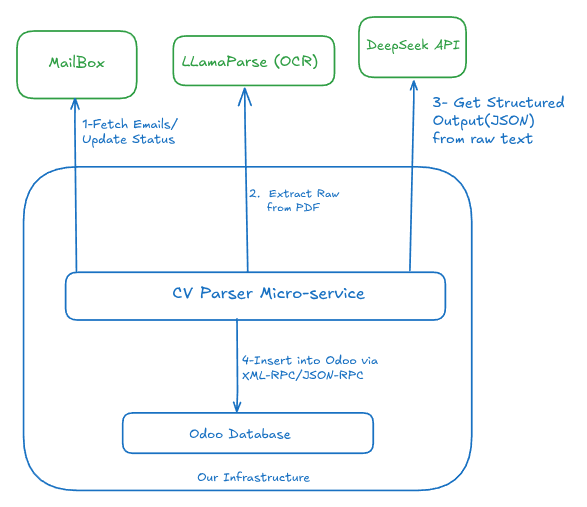
Unfortunately, we used DeepSeek for only two months before hitting a legal wall: GDPR Compliance.
DeepSeek was not compliant with European data protection laws (GDPR/RGPD). Since we were processing the personal data of French citizens, we simply could not continue using it
The Winning Setup: Google Gemini
We conducted a new migration, this time to Google Gemini, looking for a balance of affordability, efficiency, and compliance.
The result was better than expected. Gemini is so capable that we were able to drop LlamaParse entirely. We now use Gemini for both the Vision/OCR part and the data extraction. The process is very simple: we send the prompt along with the PDF attachment directly to Gemini.
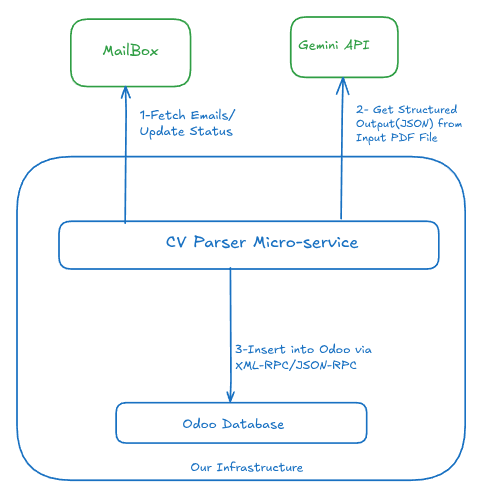
We haven’t touched the code for this microservice in over six months because it just works. Everything runs smoothly, and we are fully compliant with GDPR.
Conclusion
This journey taught us that software development is about iteration. We started with a basic open-source OCR, moved to specialized parsing tools, optimized for cost, and finally settled on a solution that offered the best mix of performance and compliance.
Today, the client’s recruiters no longer waste time on data entry. They focus on what they do best: finding the right job for the right student.

Hi, I’m Derick. I am a Software Engineer and DevOps pro. I specialize in turning complex business needs into automated workflows using Python, Odoo, and Go. I write engineering case studies here—sharing the architectural decisions and real-world code behind the solutions I build.